

 Sydney
 0452 243 240
Blog
Troubleshooting Solar Panel Output Issues: A Sydney Homeowner’s Guide


What if a lower solar reading reflects the weather or season rather than a failed panel? It’s understandable to worry when your system produces less than expected, especially when an inverter message or monitoring app doesn’t make the cause clear. Troubleshooting solar panel output issues starts with comparing reliable system data against changing conditions, rather than assuming a component has failed.
This guide explains what your monitoring data can and can’t tell you, and which safe observations to make before seeking help. You’ll learn how cloud cover, shorter daylight hours, shading, dirt and household energy use can affect readings, and why exported electricity isn’t the same as total solar generation. You’ll also learn what to record without opening equipment, climbing onto the roof or touching wiring. If the information points to a fault, or output remains unexpectedly low, professional solar system servicing can help identify the cause and clarify the next step.
Key Takeaways
- Compare solar generation with household use and grid exports to understand what each reading tells you.
- For troubleshooting solar panel output issues, check monitoring status and record inverter messages before drawing conclusions.
- Compare changes with weather, shading and other visible conditions. One low-output day alone doesn’t confirm a fault.
- Keep checks observation-only: review app data and inspect visible changes from the ground, without accessing the roof or electrical equipment.
- Repeated low output, unresolved alerts or visible damage are reasons to arrange a professional solar health check.
Why is my solar panel output low? Start with what the numbers mean
A lower figure in your solar app can be unsettling, but it doesn’t automatically mean a panel or inverter has failed. First, identify which figure has changed. Solar generation is the energy your panels produce over a period, usually recorded in kilowatt-hours (kWh). Power, measured in kilowatts (kW), is the rate of generation at a particular moment. Household consumption is electricity used in your home, while grid export is surplus electricity sent to the network after on-site use.
These readings are related, but they aren’t interchangeable. A drop in export could mean your household used more solar electricity during the day, not that the panels generated less. A cloudy day, by contrast, may reduce generation even if household energy use stays the same. Your inverter or app dashboard may show generation, consumption, export and system status separately. For background on how panels convert sunlight into electricity, see this Solar panel overview on Wikipedia.
In Sydney, readings can vary with cloud cover, seasonal daylight hours, shade from trees or nearby structures, and high summer temperatures. Household use also affects how much energy is consumed on-site rather than exported. System settings may change what the dashboard records or displays, so check the metric before comparing results.
What does a solar monitoring reading actually tell you?
Start by noting the date range, units and metric shown. A live power reading is a snapshot; a daily or monthly energy total adds generation across that period. Check for gaps or delayed updates, since missing monitoring data isn’t proof that the panels stopped producing power. Record any displayed system status alongside the generation figures.
When does lower generation suggest a system problem?
Compare like with like: similar time periods and seasons, while accounting for weather and any new shade. A persistent drop across comparable conditions, or a sudden change that continues, deserves closer investigation. One low-generation day isn’t enough to diagnose a fault. If the inverter shows a warning or status message, consult the manufacturer’s guidance for your installed model rather than guessing what the alert means.
A meaningful output change is one that appears across comparable monitoring periods, not in a single isolated reading. This data-first approach helps separate normal variation from a pattern that may need professional attention, without relying on a remote guess.
How to trace a solar output change through monitoring and system components
Once you’ve identified which reading has changed, follow a consistent trail from the monitoring record to the conditions around your system. This gives a technician useful information without requiring you to diagnose or access electrical equipment. Keep the original readings and alert wording rather than relying on memory or a single screenshot.
- Record the change. Note the affected metric, date range, units and when you first noticed the difference. Save screenshots showing earlier and current readings if possible.
- Check monitoring status. Look for gaps in the data, a communications warning or a last-updated time that doesn’t match the current date. Compare another date range if available.
- Note inverter messages. Record the displayed status or alert exactly as it appears, along with its date and time. Don’t reset the system or act on a code based on a guess.
- Compare conditions. Note cloud cover, unusual weather, new shade or other visible changes that could help explain the pattern.
The inverter converts the electricity produced by solar panels into electricity used by household appliances and, where applicable, sent to the grid. Its status can offer useful context, but a dashboard message alone may not identify the underlying cause. An app or communications fault can affect visibility of generation without proving panel failure. Don’t remove covers, handle wiring or attempt repairs. Leave equipment checks to a qualified technician.
For general background on solar technology and performance, the U.S. Department of Energy Solar Energy Technologies Office explains its work in solar research, development and deployment. For model-specific alerts and status indicators, use the manual for your own inverter.
Which inverter and monitoring signs should you record?
Capture the exact alert wording, displayed status and date and time, along with any monitoring-data gap or communications warning. Separate what the app reports from what you observe, and note whether the figures resume later. Check the manual for your installed inverter before interpreting an alert. These records help a technician assess the issue without relying on an assumed fault code.
How can shade, dirt or visible damage affect output?
From the ground, look for new shade from growing trees or nearby structures, and note visible debris or damage without climbing onto the roof. In Sydney, dirt, dust and coastal salt mist may also affect panel surfaces over time. Record what you can see and where it appears. Don’t clean panels or approach damaged equipment as part of this check.
If the recorded pattern remains unexplained, clear monitoring notes can support a professional assessment through solar system servicing. This gives the technician a useful starting point while keeping troubleshooting within safe limits.
Normal variation or solar fault? Compare the likely causes before acting
To judge a change, compare its pattern with what your system has recorded before. A gradual dip that follows shorter days or cloudy weather may have a different explanation from an abrupt drop that persists through comparable conditions. Neither pattern confirms a specific cause on its own. In Sydney, local shade, dust and salt mist can also affect what you observe, though their impact depends on your property and system.
Use this comparison to decide what to observe next, not to diagnose a component from an app or a view of the roof. A symptom narrows the investigation but does not identify a failed component on its own.
| Observed pattern | Possible explanation | Safe observation | Appropriate next step |
|---|---|---|---|
| Output varies alongside cloud or seasonal daylight changes | Changing sunlight conditions | Compare similar periods in your monitoring history and note the weather | Continue observing if readings broadly follow conditions; seek advice if the difference persists under comparable conditions |
| Generation gradually falls or changes after shade appears | Growing trees, nearby structures, soiling or another obstruction | Look from the ground for changed shade or visible debris | Record what you can see; arrange a professional assessment if the change continues |
| A sudden drop occurs, or an inverter warning repeats | A possible system or inverter issue | Note the timing, alert wording and whether monitoring data is missing | Check the inverter manufacturer’s manual and arrange qualified assessment if the warning persists |
| Visible panel damage or an apparent shutdown | Possible damage or a system fault | Observe from a safe position without touching equipment | Keep clear and arrange professional servicing |
Which output patterns may reflect changing conditions?
Cloud cover can affect generation from day to day, while seasonal daylight changes alter the conditions panels receive over longer periods. A new tree canopy or nearby obstruction may create a more local change. Compare the same type of period against your system’s own history, taking weather and visible shade into account. General performance percentages can’t reliably explain output at an individual Sydney home.
The U.S. Energy Information Administration on Solar Energy provides background on solar energy, including its benefits and limitations. For your system, its monitoring history and local conditions are more useful than a generic performance estimate.
Which signs call for a professional assessment?
Arrange a qualified assessment for a persistent unexplained drop, repeated inverter warnings, visible damage or an apparent shutdown. Hot spots and wiring faults can’t be safely confirmed by visual checks from a homeowner, and anti-islanding protection is part of the system’s electrical safety operation. Don’t touch panels, test live wiring or reset protective equipment. Share your observations and monitoring records with a solar technician instead.
This measured approach helps you distinguish a change worth watching from a sign that needs professional attention, without treating a possibility as a diagnosis.
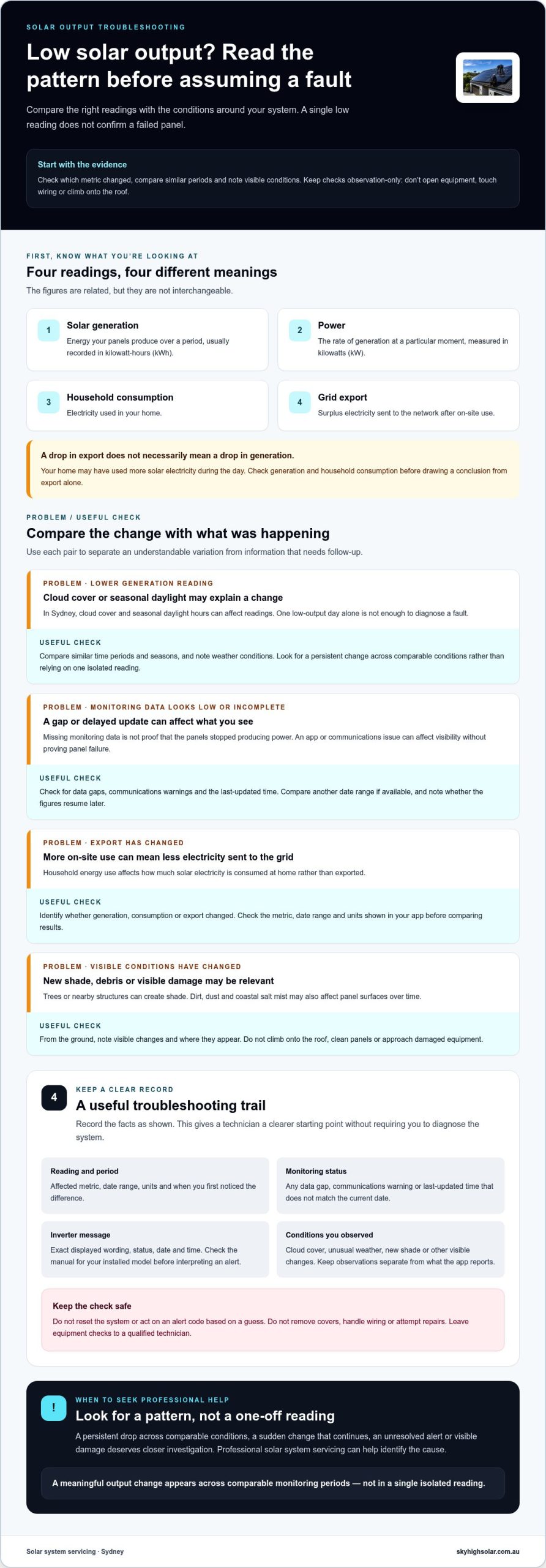
Safe solar troubleshooting checklist for Sydney homeowners
Keep your checks to information you can view without touching solar equipment. A clear record of what the monitoring platform shows, the weather and what you can see from the ground can help a technician assess the system. This observation-only approach avoids turning a worrying reading into an unsafe DIY inspection.
What can you safely check without touching electrical equipment?
Use your monitoring app or platform to check whether recent data is appearing and which measures it displays. You can also observe the inverter display from outside its casing, provided you can do so safely. Don’t remove covers or press controls to test a theory. From ground level, note new shade or visible panel damage, but don’t climb up for a closer look.
- Monitoring: Record the date range, units, latest update time and whether any readings appear to be missing.
- Weather and surroundings: Note cloud, rain or other conditions, along with new shade from trees or nearby structures.
- Inverter display: Write down the displayed status or exact alert wording. Check the manual for your specific model rather than interpreting a message from memory.
- Visible changes: Note any damage or debris you can see from a safe position on the ground. Don’t touch the panels or try to remove anything.
These observations can help distinguish a monitoring issue from a change in generation, but they can’t confirm an electrical fault. Keep the details factual. For example, record that a reading is missing rather than concluding that the panels have stopped working.
When should you avoid DIY troubleshooting?
Leave rooftop access, switchboard and isolator checks, cabling and inverter repairs to appropriately licensed professionals. Don’t open the switchboard or inverter casing, handle wiring, bypass protection, alter settings or reset protective equipment. If an instruction doesn’t match the manual for your installed model, don’t follow it. Repeated shutdowns or safety warnings call for professional assessment, not trial-and-error resets.
Stop your checks and keep clear if you notice visible damage, a burning smell or another electrical hazard. Don’t approach or touch the affected equipment. Make a note from a safe location and arrange qualified help. Safety takes priority over collecting more monitoring data.
Before arranging a service assessment, gather the inverter model, exact alert wording, approximate date the change began and comparable output records if available. Add notes about weather and visible changes. This gives the technician a clearer starting point without requiring you to inspect or diagnose the equipment yourself.
If your observations point to a possible fault, arrange professional solar system servicing for a qualified assessment.
When to book solar system servicing in Sydney
A professional solar health check is a sensible next step if your system’s output stays lower than expected across comparable periods, an inverter alert remains unresolved, or you can see damage from the ground. An apparent shutdown also warrants assessment. A single unusual reading may not tell you much, but a persistent pattern or recurring warning deserves more than guesswork.
You don’t need to identify a failed component. A technician can assess relevant system components and monitoring information, then explain suitable next steps. The assessment may help distinguish an issue with generation from a monitoring or communications problem, but the cause and required work depend on the system and what the inspection finds. If you suspect a fault, an app reading can’t replace a professional assessment.
What information helps a solar technician assess the issue?
Useful service notes make it easier to understand the pattern you’ve observed. Share dated monitoring records and the exact wording of any alert rather than paraphrasing it. Include the inverter make and model if available, when you first noticed the change, and whether it seems constant or intermittent. Describe relevant weather, new shade or visible damage, keeping observations to what you can safely see.
- Monitoring records: Include the metric, units, date range and comparable readings from before and after the change.
- System information: Note the inverter model and any displayed status messages.
- Timing: Give an approximate start date and say whether the pattern continues or comes and goes.
- Safe observations: Mention visible shade or damage, and any monitoring-data gaps.
These details don’t diagnose the fault, but they give the technician a clear starting point. Stick to records and observations. Don’t climb onto the roof, open equipment or attempt a reset to gather more information.
How Sky High Solar and Electrical supports local system servicing
Sky High Solar and Electrical provides Solar System Servicing and solar health checks for homeowners with output concerns. During a professional assessment, the technician can consider your monitoring records alongside the system’s condition and reported alerts, then discuss what should happen next. The aim is a clear, evidence-led assessment, not a remote promise about the cause or repair outcome.
Local servicing is available across Penrith, Parramatta, Blue Mountains, Richmond, Liverpool, Sydney Metro, Northern Beaches and surrounding regions. If repeated low output, unresolved alerts or visible damage have left you unsure what to do, arrange a professional solar health check. Your dated readings and notes can make the assessment more useful while keeping troubleshooting safe and practical.
Make your solar data useful over time
Your monitoring history can help you understand how system output changes alongside your household’s energy needs. Over time, that context can inform decisions about when you use electricity and which performance patterns are typical for your home. The value lies not in reacting to every fluctuation, but in making choices with a clearer view of your own system.
If a concern remains, rely on evidence and qualified expertise rather than changing electrical equipment yourself. Keep the information you’ve gathered accessible so it can support future conversations about your system’s care.
As your energy needs change, explore ongoing solar care options to help you plan confidently for the years ahead.
Frequently Asked Questions
Why is my solar system producing less electricity than usual?
A lower electricity bill credit or export figure doesn’t necessarily mean your panels generated less. If your system includes a battery, some solar energy may be stored instead of exported. For troubleshooting solar panel output issues, check the generation figure in your monitoring platform and compare its reporting dates with your electricity bill period. Those records measure different things and may use different date ranges, so don’t treat them as direct equivalents.
Is it normal for solar panels to produce less power on cloudy days?
Yes, cloud cover can reduce the sunlight reaching the panels, but readings may change throughout the day as clouds move. A daily total can hide these shorter fluctuations. If you’re reviewing a particular dip, note roughly when it occurred and whether the monitoring graph shows a brief change or a longer interruption. This context is more useful than describing the whole day simply as cloudy.
Can I reset my solar inverter if the panels are not producing?
Don’t reset it by guesswork. Identify the inverter’s exact model using your installation paperwork or monitoring account, then consult the matching manufacturer manual for any reset guidance. Manuals for different models can give different instructions, so a general online video or advice for another unit may not apply. If you can’t identify the model or safely follow its instructions, leave the controls alone and seek qualified assistance.
What should I do if my solar monitoring app shows no data?
Check whether the issue is limited to the app by confirming your phone has an internet connection and reopening the monitoring platform. Note whether the same gap appears on another device, if one is available, and whether the app shows a sign-in or communications message. These checks can help distinguish an account or device display issue from a system concern without changing electrical settings.
What happens if my solar inverter keeps shutting down?
Repeated shutdowns should be assessed by a qualified solar professional. Note whether the home also experiences a power interruption or whether the concern is limited to the solar monitoring display. Don’t test this by operating electrical equipment or restarting the inverter. If you smell burning, see damage or suspect an electrical hazard, keep clear and seek qualified help rather than continuing to observe the unit.
Should I clean solar panels if their output has dropped?
First consider safe access and the panel manufacturer’s care instructions. Rooftop work can expose you to fall and electrical hazards, and unsuitable cleaning tools or methods may damage equipment. If the panels look soiled from the ground, note the location and appearance rather than trying to reach or wash them. A qualified maintenance professional can advise on appropriate care for the installed system.
When should I book solar system servicing for low output?
Book an assessment if the issue remains unexplained or you’re concerned about a warning, shutdown or visible damage. Keep installation documents and previous service records available, as they can help identify the system configuration and its history. Sky High Solar and Electrical provides solar system servicing for Sydney homeowners. Book a professional solar system servicing assessment to review the available evidence and clarify suitable next steps without assuming a repair is needed.